FA-Panel alarm function
The alarm function of FA-Panel consists of "Alarm serverAction" on the Panel Server side and the screen library on the Panel Browser side.
Alarm information is managed and monitored by Panel Server's Alarm server action. Alarm information detected by Panel Server is saved as an alarm log on the disk of the PC running Panel Server. Then, on the client side, Panel Browser, the screens are displayed using the screen libraries provided for the alarm function: "Alarm Summary," "Alarm History," "Event Real Time," and "Event History." In addition, Alarm server actions also have a function that automatically sends an email when an alarm is detected.
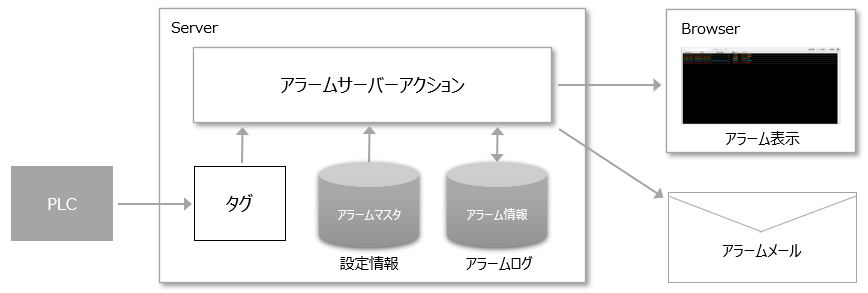
When building an alarm function in FA-Panel, you need to include the alarm screen library in the project and configure the Alarm server action.
Also, Alarm server actions monitor alarms by reading a configuration file called "alarm master" when they are executed. Alarm master is a text file in CSV format, and can be freely edited.
The basic concept of the alarm function is explained below.
content |
overview |
What is alarm summary/alarm history?
|
This section explains the concepts of alarm summary and alarm history. |
What is Event History/Event Real-time?
|
We will explain the concepts of event history and event real-time. |
About the Alarm Screen Library
|
This section describes the alarm screen library. |
|
|
Alarm serverDescribes the type of action. |
|
|
This section explains the main settings of the alarm function, such as the alarm master format and the alarm retention period settings.
|