Example of system configuration and settings for simple recording (minimum configuration with only one PC)
This section explains an example of a system configuration for simple recording using only one PC.
If you are performing simple recording using only one PC, please set the network camera and recording settings to a low fps value. Simple recording is intended for up to 5 cameras, with a SVGA resolution and a recording frame rate of about 2 fps.
Key points of this configuration
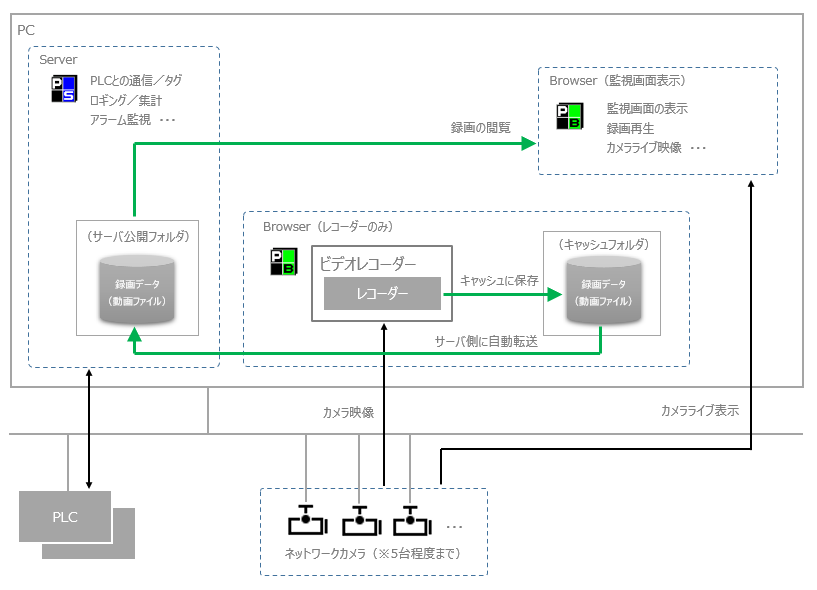
•A server (Panel Server), video recorder (Panel Browser), and monitoring screen (Panel Browser) run on a single PC.
•The destination for recording data and the destination for viewing are both set on the server side, and no transfer settings are used.
•Limit the number of cameras connected simultaneously to around five, and set the frame rate low for both the camera itself and the recording settings.
Expected specifications
item |
Setting values etc. |
supplement |
Video Compression Method |
MJPEG |
Connection is also possible with "H.264". |
Camera Image Resolution |
SVGA (800*600) |
Set on the camera. |
Camera quality |
usually |
Set on the camera. |
Camera Frame Rate |
1fps |
Set on the camera. Set to 5fps or less. |
Recording Frame Rate |
2fps |
Set from the recording settings when registering the camera. |
Number of cameras connected simultaneously |
Up to 5 units |
If you wish to record on more than the number listed above, this can be achieved by distributing the recorder terminal PCs. |
|
The recording process of the video recorder may increase the processing load on the PC. Therefore, if you configure a system with only one PC, it may affect the various server processes run by Panel Server. When configuring a system with only one PC, be sure to actually verify the operation and confirm that other functions such as alarms and logging are not affected. If you determine that the processing load is too high or if you need to record at a high frame rate, please refer to "Recommended system configuration" and consider distributing the load using multiple PCs. |

System configuration image
Components |
explanation |
||||||||||||||||||||
PC
|
This is configured to run all of the following functions on one PC.
Server functions (Panel Server)
Panel Server executes various server functions such as tags, alarms and logging.
Video Recorder (Panel Browser)
Prepare a client configuration file that runs only the video recorder and run it in Panel Browser. This Panel Browser will perform the recording process. Note that this Panel Browser should be dedicated to recording, and it is usually a good idea to keep it minimized as an icon.
Monitoring screen display (Panel Browser)
Prepare a client setting file for displaying graphic screens, etc., and run it on a Panel Browser separate from the client for the video recorder. Viewing/playing back recorded data, displaying graphic screens, and other screen displays for various functions (alarms, trends, etc.) should be performed on this client side.
|
||||||||||||||||||||
Network Camera |
Below is an example of camera body settings. For details on tuning the camera body, please refer to "About camera body settings and tuning".
|
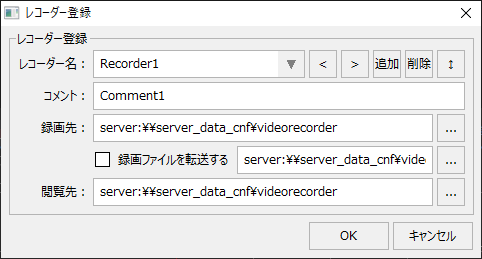

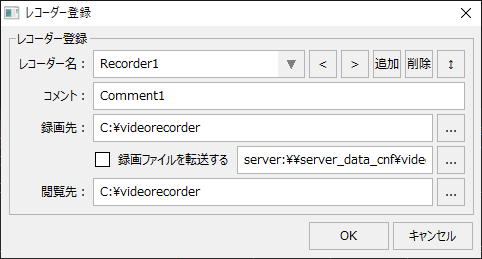
Points to note about this configuration
Important points to note |
explanation |
||
How many cameras can be connected at the same time? |
When recording with the minimum configuration like this configuration, the number of cameras that can be connected simultaneously should be limited to about "5", and the frame rate of the camera itself should also be set to 5 or less. When configuring a system with only one PC, be sure to actually test the operation and confirm that there is no impact on other functions such as alarms and logging. If the processing load is deemed too high, refer to "Recommended system configuration" and consider distributing the load using multiple PCs. |
||
When server duplication is required
|
If you are using only one PC, please do not duplicate the server. For details on using the video recorder function in a duplicated server configuration, please refer to the description in "When operating a duplicated server".
|