System configuration for server duplication
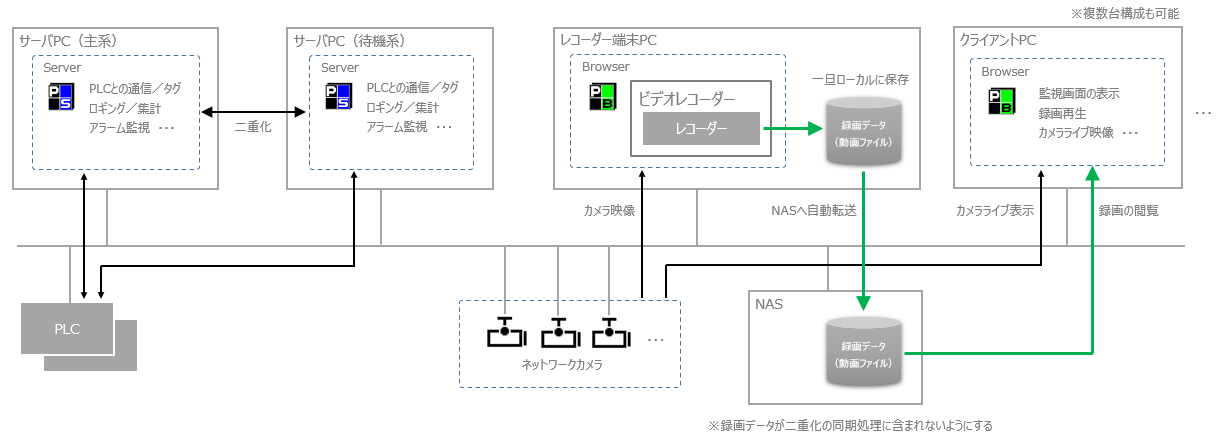
When using the video recorder function in a server duplication configuration, configure the system so that the recording data file is not included in the duplication synchronization process. Specifically, prepare a network drive such as NAS or File server (hereinafter referred to as the "NAS drive") as the data store for storing the recording data, and set the recording destination as the local disk, the transfer destination as the NAS drive, and the viewing destination as the NAS drive.
Image of server duplication system configuration
Components |
explanation |
Server PC (Panel Server) |
Prepare two server PCs and operate Panel Server as a duplicated system. The method for setting up a duplicated server is the same as for a normal duplicated system. For details about server duplication, see "Operation with server duplication" in "System Installation and Operation." |
Recorder terminal PC (Panel Browser) |
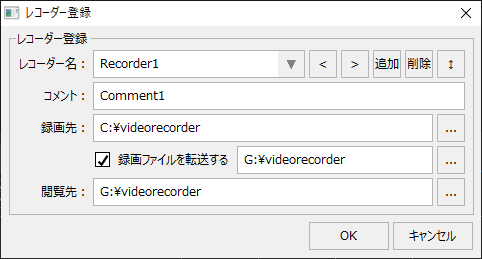
Prepare a recorder terminal PC for recording and perform the recording process. The settings for registering the recorder are the same as those in "Recommended system configuration", with the recording destination set to the local disk, transfer to the NAS drive, and the viewing destination set to the NAS drive.
Key points: ❖Prepare a folder for recording separately from the project folder on the local disk of the recorder terminal PC. ❖Prepare a KNAS and set it up so that it can connect to the KNAS drive via network sharing. Also, prepare a folder on the drive for recording. ❖When registering the recorder, specify the recording destination as a folder on the local disk rather than a server (C:\videorecorder). ❖Specify a folder on the NAS drive to transfer and view the recorded files (G:\videorecorder).
(Example of recorder registration settings)
|
Client PC (Panel Browser) |
The client PC that displays the graphic screen, etc. will be prepared separately from the recorder terminal PC.
|
Storage for recorded data (e.g. NAS) |
Use NAS or File server as the destination for transferring the recorded data. The selection points are the same as those in "Recommended system configuration".
|
Points to note about this configuration
Important points to note |
explanation |
Users must make the recording data redundant themselves.
|
The video recorder function does not support redundancy. If you want to make the recorded data transferred to NAS redundant, you will need to create a mechanism for it yourself (for example, by using the NAS function to create a RAID configuration, or by creating a mechanism for backing up to a separate drive). |