About the Mini Property Box
One of the convenient editing features of Panel Editor is the "mini property box."
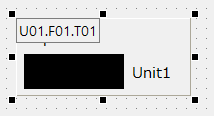
The mini property box allows you to display any property of a selected control in the upper left corner of the control. If multiple controls are selected at the same time, the mini property box is displayed for all selected controls as well. In addition to displaying any selected property on the property page, you can also edit the value. Also, by selecting multiple controls at the same time and displaying the mini property box, you can intuitively operate from the screen when setting the same property for multiple controls.
|
The image on the left shows the _TagIn property of a numeric display part from the parts library.
You can also edit the property values directly from the mini property box.
|
For details on each operation method, please see below.
How to display the mini property box
Basic operations in the Mini Properties box
Application of Mini Property Box