Login settings for your own project (Login settings for Panel-Interface/Public projects)
If you are running a client in file distribution format in an original project that does not use the standard framework, you will need to register the login user information from the login information of Panel Server's Panel-Interface.
|
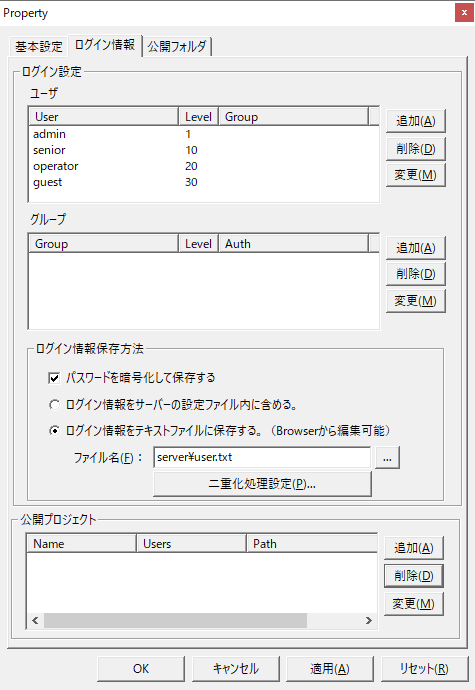
Shown on the left is the properties screen (login information) for Panel-Interface on Panel Server.

|
If you are incorporating the standard user management function into your own project, there is no need to change the login settings listed above, as they will be edited from the client's user management screen.
|
Login settings/
User
|
Please set the login user information for Panel Server. Please refer to "Registering a login user for your own project" for the registration method. However, if you are using the standard user management function, there is no need to make any changes here.
|
Login settings/
group
|
Set the user's group information as necessary. Group registration is not required. For details on how to register, please refer to "Registering login users for your own project". However, if you are using the standard user management function, there is no need to make any changes here.
|
Login settings/
How to save login information
|
Please set how you want to save your login information. Please refer to "Registering a login user for your own project" for how to register.
If you are using a duplicated configuration for Panel Server, please configure the duplication process. For details, please refer to "Operation with Server Duplication".
|
Public Projects
|
If you are running the program in file distribution format, you do not need to define a public project.
If you have any unnecessary public projects registered, delete them.
|
|