OpenModalCommonDialog

<< Click to Display Table of Contents >>

Manual > Control Reference > Common to all controls > Common methods >

OpenModalCommonDialog


Opens common dialogs modally (for simple common dialog customization).


hmtoggle_plus1Explanation


Syntax 1

OpenModalCommonDialog(

         "RCMsg",

         "SetInfo",

         msg

         )


cr_0002


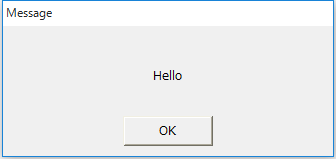
Opens a message box. Same as OpenModalMsg.


Parameters


dialogtype


Type:

character


Specify the form name of the dialog you added by customizing. Please specify the fixed value "RCMsg".


inifunc


Type:

character


Please specify the fixed value "SetInfo".


msg


Type:

character


The message to display.


Return Value


Type:

Boolean


FALSE - Failure. TRUE - Success.


Syntax 2

OpenModalCommonDialog (

         "RCYesNoMsg",

         "SetInfo",

         target,

         msg        

         )


cr_0003


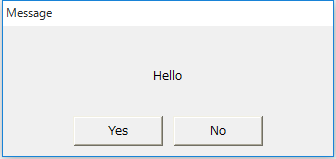
Opens a message box with a Yes/No button. Same as OpenModalYesNoMsg.


Parameters


dialogtype


Type:

character


Specify the form name of the dialog you added by customizing. Specify the fixed value "RCYesNoMsg".


inifunc


Type:

character


Please specify the fixed value "SetInfo".


target


Type:

character


Yes/NoA control that notifies you by issuing a OnCommonEvent event when either button is pressed.


msg


Type:

character


The message to display.


Return Value


Type:

Boolean


FALSE - Failure. TRUE - Success.


<OnCommonEvent>


name


Type:

character


Returns the name specified when opening.


value


Type:

Boolean


TRUE - The Yes button was pressed. FALSE - The No button was pressed.


Syntax 3

OpenModalCommonDialog (

         "RCYesNoCancelMsg",

         "SetInfo",

         target,

         msg

         )


cr_0004


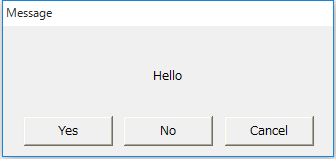
Opens a message box with Yes/No/Cancel buttons. Same as OpenModalYesNoCancelMsg.


Parameters


dialogtype


Type:

character


Specify the form name of the dialog you added by customizing. Specify the fixed value "RCYesNoCancelMsg".


inifunc


Type:

character


Please specify the fixed value "SetInfo".


target


Type:

Object


A control that notifies by the OnCommonEvent event when the Yes/No/Cancel button is pressed.


msg


Type:

character


The message to display.


Return Value


Type:

Boolean


FALSE - Failure. TRUE - Success.


<OnCommonEvent>


name


Type:

character


Returns the name specified when opening.


value


Type:

character


"yes" - The Yes button was pressed. "no" - The No button was pressed. "cancel" - The Cancel button was pressed.


Syntax 4

OpenModalCommonDialog (

         "RCPassword",

         "SetInfo",

         target,

         password,

         mode

         )


cr_0005


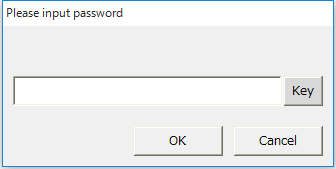
Opens the password setting dialog. Same as OpenModalPassword.


Parameters


dialogtype


Type:

character


Specify the form name of the dialog you added by customizing. Specify the fixed value "RCPassword".


inifunc


Type:

character


Please specify the fixed value "SetInfo".


target


Type:

Object


A control that notifies you via the OnCommonEvent event whether the correct password was entered.


msg


Type:

character


password.


mode


Type:

character


"normal" - When you press the OK button and the password is incorrect, the dialog will close without prompting you to re-enter it.

"inputagain" - If you press the OK button and the password is incorrect, the dialog will not close and you will be asked to re-enter the password.


Return Value


Type:

Boolean


FALSE - Failure. TRUE - Success.


<OnCommonEvent>


name


Type:

character


Returns the name specified when opening.


value


Type:

Boolean


TRUE - The correct password was entered.

FALSE - The password is incorrect or the Cancel button was pressed.


Syntax 5

OpenModalCommonDialog (

         "RCNumKey",

         "SetInfo",

         target,

         text,

         texttype,

         textformat

         )


cr_0006


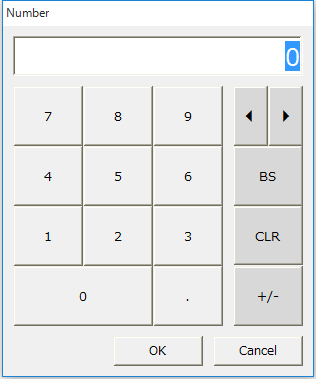
Opens the numeric keyboard. Equivalent to OpenModalNumKey.


Parameters


dialogtype


Type:

character


Specify the form name of the dialog you added by customizing. Specify the fixed value "RCNumKey".


inifunc


Type:

character


Please specify the fixed value "SetInfo".


target


Type:

Object


A control that notifies the input number via the OnCommonEvent event.


text


Type:

character


The text to display by default.


texttype


Type:

character


Please refer to the Edit box controlTextType property.


textformat


Type:

character


Please refer to the Edit box controlTextType property.


Return Value


Type:

Boolean


FALSE - Failure. TRUE - Success.


<OnCommonEvent>


name


Type:

character


Returns the name specified when opening.


value


Type:

character


The numeric value entered.


Syntax 6

OpenModalCommonDialog (

         "RCNumKey",

         "SetInfoEdit",

         target

         )


cr_0006


Opens a numeric keyboard for the edit box. Same as OpenModalNumKeyEdit.


Parameters


dialogtype


Type:

character


Specify the form name of the dialog you added by customizing. Specify the fixed value "RCNumKey".


inifunc


Type:

character


Please specify the fixed value "SetInfoEdit".


target


Type:

Object


Reflect the entered number Edit box control.


Return Value


Type:

Boolean


FALSE - Failure. TRUE - Success.


Syntax 7

OpenModalCommonDialog (

         "RCTextKey",

         "SetInfo",

         target,

         text,

         texttype,

         textformat

         )


cr_0007


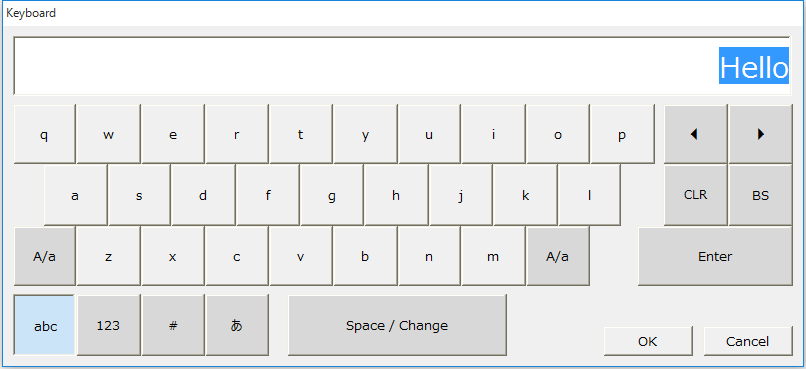
Opens the text keyboard. Same as OpenModalTextKey.


Parameters


dialogtype


Type:

character


Specify the form name of the dialog you added by customizing. Specify the fixed value "RCTextKey".


inifunc


Type:

character


Please specify the fixed value "SetInfo".


target


Type:

Object


A control that notifies the input number via the OnCommonEvent event.


text


Type:

character


The text to display by default.


texttype


Type:

character


Please refer to the Edit box controlTextType property.


textformat


Type:

character


Please refer to the Edit box controlTextType property.


Return Value


Type:

Boolean


FALSE - Failure. TRUE - Success.


<OnCommonEvent>


name


Type:

character


Returns the name specified when opening.


value


Type:

character


The characters entered.


Syntax 8

OpenModalCommonDialog (

         "RCTextKey",

         "SetInfoEdit",

         target

         )


cr_0007


Opens a text keyboard for the edit box. Same as OpenModalTextKeyEdit.


Parameters


dialogtype


Type:

character


Specify the form name of the dialog you added by customizing. Specify the fixed value "RCTextKey".


inifunc


Type:

character


Please specify the fixed value "SetInfoEdit".


target


Type:

Object


Reflects the entered characters Edit box control.


Return Value


Type:

Boolean


FALSE - Failure. TRUE - Success.


Syntax 9

OpenModalCommonDialog (

         "RCCalendar",

         "SetInfo",

         target,

         startdate,

         enddate,

         selectarea

         )


cr_0008


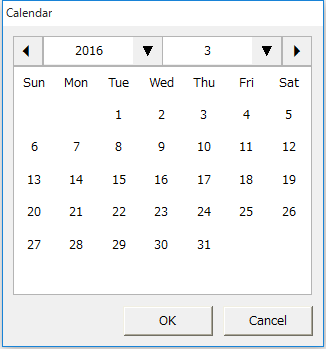
Opens the calendar dialog. Same as OpenModalCalendar.


Parameters


dialogtype


Type:

character


Specify the form name of the dialog you added by customizing. Please specify the fixed value "RCCalendar".


inifunc


Type:

character


Please specify the fixed value "SetInfo".


target


Type:

Object


A control that notifies the currently selected date via the OnCommonEvent event when the OK button is pressed.


startdate


Type:

time


The start date to select. If set to 0, no date is specified.


enddate


Type:

time


End date to select. If set to 0, no date is specified.


selectarea


Type:

character


DAY" - Select a date

"DAYS" - Select a period (a number of consecutive dates)

For details, please refer to Calendar control.


Return Value


Type:

Boolean


FALSE - Failure. TRUE - Success.


<OnCommonEvent>


name


Type:

character


"RCCalendar"


value


Type:

character


value[0] - Selected start date

value[1] - Selected end date

When selectarea is "DAY", value[0] and value[1] will be the same date.


Syntax 10

OpenModalCommonDialog (

         "RCFormMap",

         "SetFormMap",

         form

         )


cr_0009


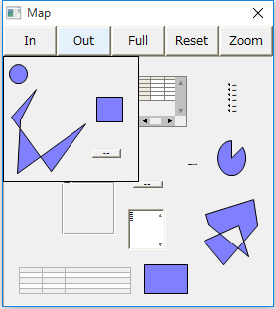
Opens the form map dialog. Same as OpenModalFormMap.


Parameters


dialogtype


Type:

character


Specify the form name of the dialog you added by customizing. Specify the fixed value "RCFormMap".


inifunc


Type:

character


Please specify the fixed value "SetFormMap".


form


Type:

Object


Form to display


Return Value


Type:

Boolean


FALSE - Failure. TRUE - Success.


Syntax 11

OpenModalCommonDialog (

         "RCColor",

         "SetInfo",

         target,

         color,

         bClearColor

         )


cr_0188


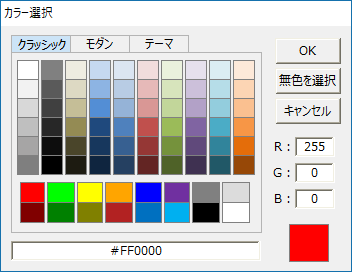
Opens a color selection dialog. Same as OpenModalColor.


Parameters


dialogtype


Type:

character


Specify the form name of the dialog you added by customizing. Please specify the fixed value "RCColor".


inifunc


Type:

character


Please specify the fixed value "SetInfo".


target


Type:

Object


A control that notifies the currently selected color via the OnCommonEvent event when the OK button is pressed.


color


Type:

character


The default color to display.


bColor


Type:

Boolean


FALSE - Hide the colorless selection. TRUE - Show the colorless selection.


Return Value


Type:

Boolean


FALSE - Failure. TRUE - Success.


<OnCommonEvent>


Nname


Type:

character


"RCColor"


value


Type:

character


Selected color text.


Syntax 12

OpenModalCommonDialog (

         "RCSearch",

         "SetInfo",

         target,

         searchDatas,

         title,

         separator,

         allText,

         selectedData,

         searchText,

         selectedCategory,

         selectedSubCategory,

         selectedSubsubCategory

         )


cr_0189


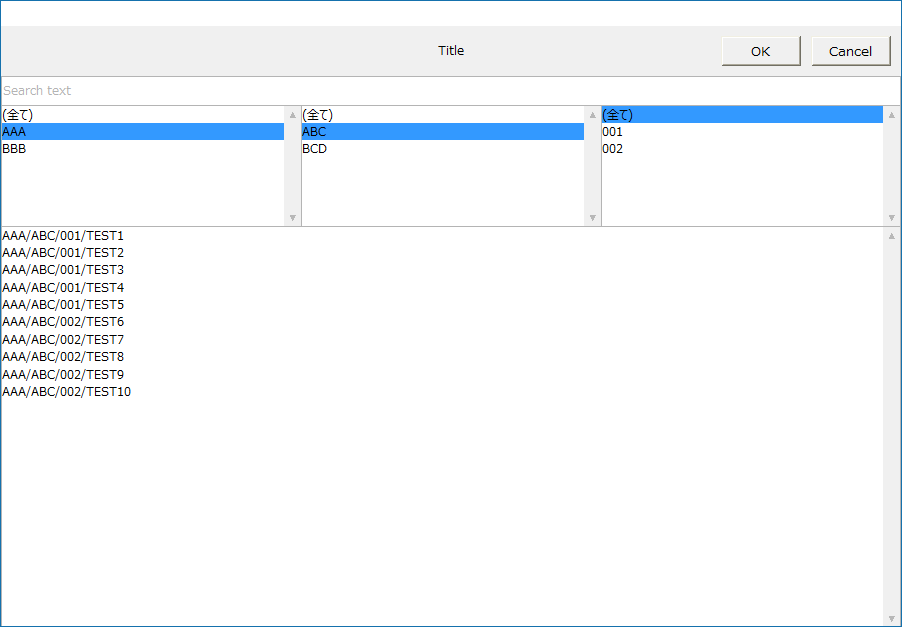
Opens the search selection dialog. Same as OpenModalSearch.


Parameters

dialogtype


Type:

character


Specify the form name of the dialog you added by customizing. Please specify the fixed value "RCSearch".


inifunc


Type:

character


Please specify the fixed value "SetInfo".


target


Type:

Object


A control that notifies the currently selected search string via the OnCommonEvent event when the OK button is pressed.


searchDatas


Type:

Characters (array)


The array of strings to search.


title


Type:

character


Title string.


separator


Type:

character


searchDatas A delimited string for classifying character sequences into three categories.


allText


Type:

character


A string used to select all items in a classified category.


selectedData


Type:

character


The initial selection character from the searchDatas character array.


searchText


Type:

character


The initial search string.


selectedCategory


Type:

character


The initial selection character for the major category.


selectedSubCategory


Type:

character


The initial selection character for the medium category.


selectedSubsubCategory


Type:

character


Initial selection character for minor category.


Return Value


Type:

Boolean


FALSE - Failure. TRUE - Success.


<OnCommonEvent>


name


Type:

character


"RCSearch"


value


Type:

character


The selected string.


Supported


×

Script Action

○

Browser script

×

Calculation Expression Syntax


reference