<< Click to Display Table of Contents >>
Manual > Control Reference > Common to all controls > Common methods >
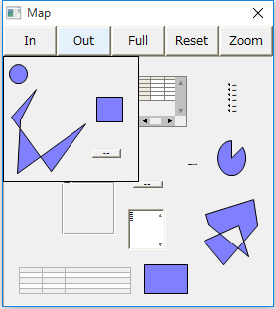
Opens the Form Map dialog modally.
syntax
OpenModalFormMap(
target
)
Parameters
Type:
Object
The form to display, or
Return Value
Boolean
FALSE - Failure. TRUE - Success.
Explanation
Opens the Form Map dialog modally. The actions of each button are as follows:
In: Click to enlarge
Out: Display in a reduced size
Full: Stretch the screen to display the entire image
Reset : Display the form in actual size
Zoom: Press the zoom button and drag the mouse to enlarge the area you want to enlarge.
Supported
×
Script Action
Can be used in server script Ver2 actions
○
Browser script
Can be used in browser scripts
Calculation Expression Syntax
Can be used in expression syntax (e.g. bind syntax)
reference
OpenMsg
OpenModalMsg
CloseMsg
OpenYesNoMsg
OpenModalYesNoMsg
CloseYesNoMsg
OpenYesNoCancelMsg
OpenModalYesNoCancelMsg
CloseYesNoCancelMsg
OpenPassword
OpenModalPassword
ClosePassword
OpenNumKey
OpenModalNumKey
OpenNumKeyEdit
OpenModalNumKeyEdit
CloseNumKey
OpenTextKey
OpenModalTextKey
OpenTextKeyEdit
OpenModalTextKeyEdit
CloseTextKey
OpenCalendar
OpenModalCalendar
CloseCalendar
OpenFormMap
OpenModalFormMap
CloseFormMap
SetFormMap
ClearFormMap
RefreshFormMap
OpenColor
OpenModalColor
CloseColor
OpenSearch
OpenModalSearch
CloseSearch
OpenCommonDialog
OpenModalCommonDialog
CloseCommonDialog
OpenWindowsDialog