OpenWindowsDialog

<< Click to Display Table of Contents >>

Manual > Control Reference > Common to all controls > Common methods >

OpenWindowsDialog


Open a Windows dialog.


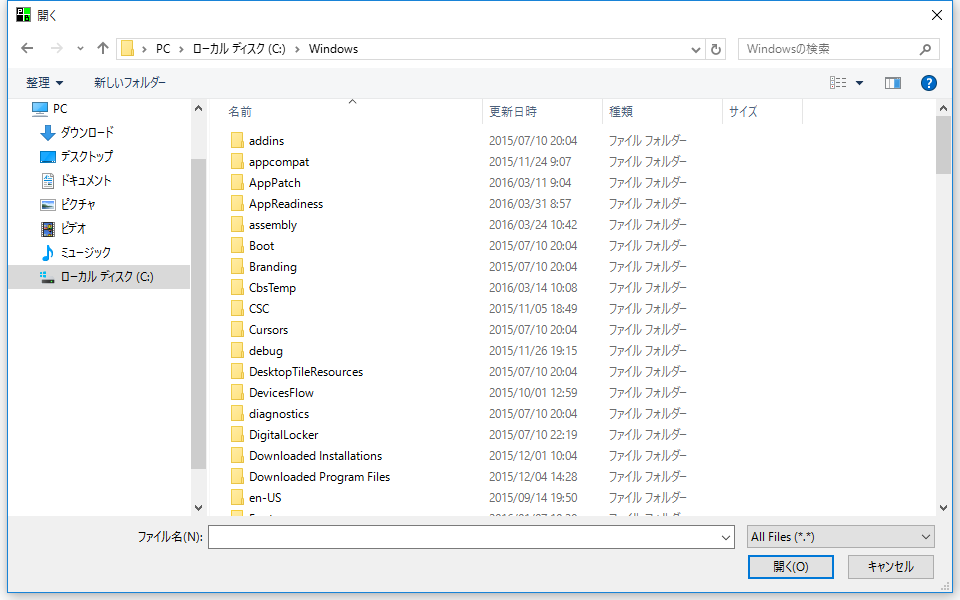
Syntax 1

OpenWindowsDialog(

         target,

         "file"

         [,bOpenFileDialog = TRUE]

         [,defExt = ""]

         [,fileName = ""]

         [,filter = "All Files (*.*)|*.*||"]

         [,defDir = ""]

         )


cr_0010


Parameters


target


Type:

Object


A control that notifies the input number via the OnCommonEvent event.


dialogtype


Type:

character


Please specify the fixed value "file".


bOpenFileDialog


Type:

character


TRUE - File Open dialog

FALSE - Save As dialog


defExt


Type:

character


Default file extension. If you enter a file name in the edit box without adding an extension, the extension specified by DefExt is automatically added.


fileName


Type:

character


The file name that is initially displayed in the edit box for entering a file name.


filter


Type:

character


A pair of strings specifying a filter to locate files so that the File Name list box displays only the selection.


The first string in the pair is the filter specification, and the second string indicates the file extension to use. Multiple extensions can be specified by using ';' as separators. The string ends with two '|' characters.


Example: All files

"All files (*.*)|*.*||"


Example: Text file

"Text file (*.txt)|*.txt||"


Example: Text file + All files

"Text files (*.txt)|*.txt|All files (*.*)|*.*||"


Example) CSV + text file + all files

"CSV(Comma delimited) files (*.csv)|*.csv|Text files (*.txt)|*.txt|All files (*.*)|*.*||"


defDir


Type:

character


The folder that is displayed by default.


Return Value


Type:

Boolean


FALSE - Failure. TRUE - Success.


<OnCommonEvent>


name


Type:

character


"WINFile"


value


Type:

character


Returns the result.

value[0] - Cancel when FALSE (Boolean type)

value[1] - File path (character type)


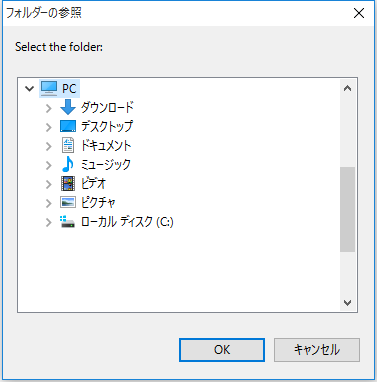
Syntax 2

OpenWindowsDialog (

         target,

         "folder"

         [,title = ""]        

         [,defDir = ""]

         )


cr_0011


Parameters


target


Type:

Object


A control that notifies the input number via the OnCommonEvent event.


dialogtype


Type:

character


Please specify the fixed value "folder".


title


Type:

character


title


defDir


Type:

character


The folder that is displayed by default.


Return Value


Type:

Boolean


FALSE - Failure. TRUE - Success.


<OnCommonEvent>


name


Type:

character


"WINFolder"


value


Type:

character


Returns the result.

value[0] - Cancel when FALSE (Boolean type)

value[1] - Folder path (character type)


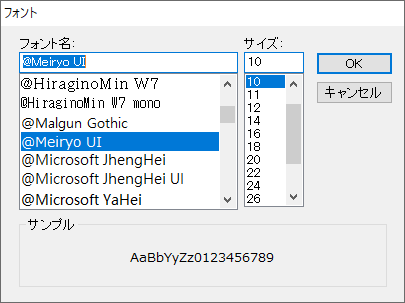
Syntax 3

OpenWindowsDialog (

         target,

         "font"

         [,font = ""]        

         )
 

cr_0166


Parameters


target


Type:

Object


A control that notifies the input number via the OnCommonEvent event.


dialogtype


Type:

character


Please specify the fixed value "font".


font


Type:

character


Specifies the default font format string.


Return Value


Type:

Boolean


FALSE - Failure. TRUE - Success.


<OnCommonEvent>


name


Type:

character


"WINFont"


value


Type:

character


Returns the result.

value[0] - Cancel when FALSE (Boolean type)

value[1] - Font format (character type)


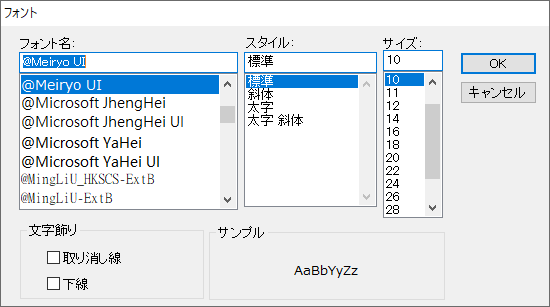
Syntax 4

OpenWindowsDialog (

         target,

         "font_simple"

         [,font = ""]        

         )


cr_0200


Parameters


target


Type:

Object


A control that notifies the input number via the OnCommonEvent event.


dialogtype


Type:

character


Please specify the fixed value "font_simple".


font


Type:

character


Specifies the default font format string.


Return Value


Type:

Boolean


FALSE - Failure. TRUE - Success.


<OnCommonEvent>


name


Type:

character


"WINFont"


value


Type:

character


Returns the result.

value[0] - Cancel when FALSE (Boolean type)

value[1] - Font format (character type)


attention

Do not close the form containing the control specified by target before closing the Windows dialog.

If you close the form containing target before closing the Windows dialog, an application error will occur when the Windows dialog is closed.


Supported


×

Script Action

○

Browser script

×

Calculation Expression Syntax


reference