OpenModalSearch

<< Click to Display Table of Contents >>

Manual > Control Reference > Common to all controls > Common methods >

OpenModalSearch


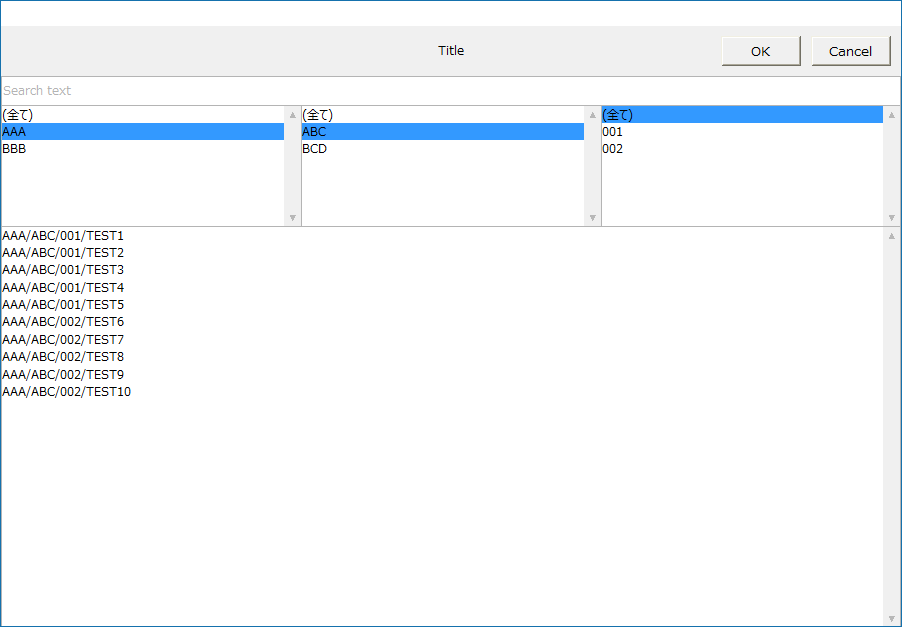
Simple common dialogOpens the search dialog modally.


syntax

OpenModalSearch(

         target,

         searchDatas,

         title,

         separator,

         allText,

         selectedData,

         searchText,

         selectedCategory,

         selectedSubCategory,

         selectedSubsubCategory

         )


cr_0189


Parameters

target


Type:

Object


An object that notifies the currently selected search string via the OnCommonEvent event when the OK button is pressed.


searchDatas


Type:

Characters (array)


The array of strings to search.


title


Type:

character


Title string.


separator


Type:

character


searchDatas A delimited string for classifying character sequences into three categories.


allText


Type:

character


A string used to select all items in a classified category.


selectedData


Type:

character


The initial selection character from the searchDatas character array.


searchText


Type:

character


The initial search string.


selectedCategory


Type:

character


The initial selection character for the major category.


selectedSubCategory


Type:

character


The initial selection character for the medium category.


selectedSubsubCategory


Type:

character


Initial selection character for minor category.


Return Value


Type:

Boolean


FALSE - Failure. TRUE - Success.


<OnCommonEvent>


name


Type:

character


"RCSearch"


value


Type:

General purpose


The selection results (array).

value[0] - Enabled/Disabled

value[1] - selected string

value[2] - search string

value[3] - Filter text 1

value[4] - Filter text 2

value[5] - Filter text 3


hmtoggle_plus1Explanation


Supported


×

Script Action

○

Browser script

×

Calculation Expression Syntax


reference